

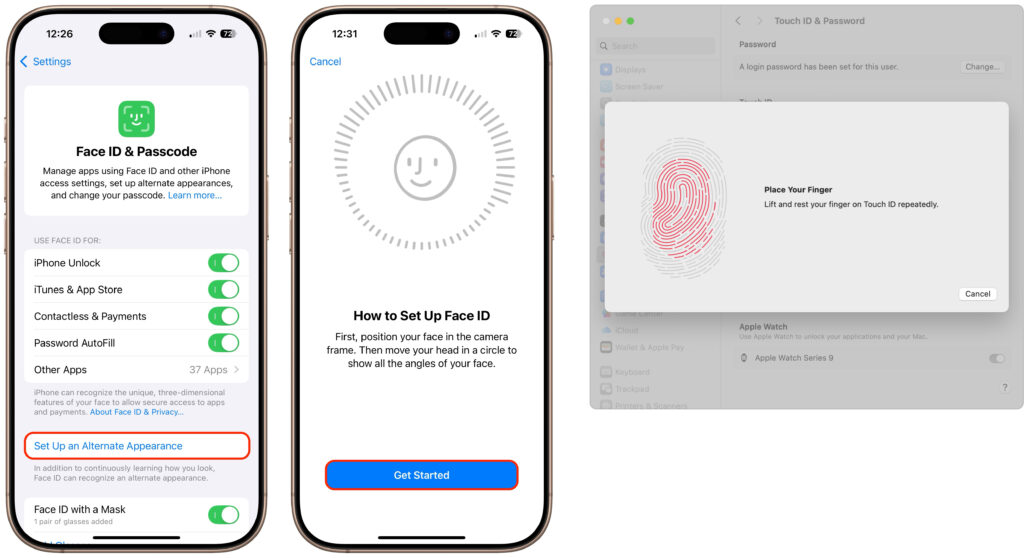
It’s only safe to share your iPhone, iPad, and Mac passcodes and passwords with people you trust completely, which typically includes family members whom you would trust with your healthcare and bank accounts. If those people also use your devices regularly, you can simplify their access by adding their fingerprint to Touch ID or their face to Face ID. Touch ID allows you to add up to five fingerprints, while Face ID provides an option for a second face. Both can be easily set up in Settings > Face/Touch ID & Passcode (iPhone and iPad) and System Settings > Touch ID & Password (Mac).
Make Apple devices easier for pa by setting up secondary biometrics, a practical way to help a parent or other trusted family member unlock and use an iPhone, iPad, or Mac when needed. This feature can improve everyday access while still keeping the device secure and convenient for the primary user.
(Featured image by iStock.com/Giulio Fornasar