

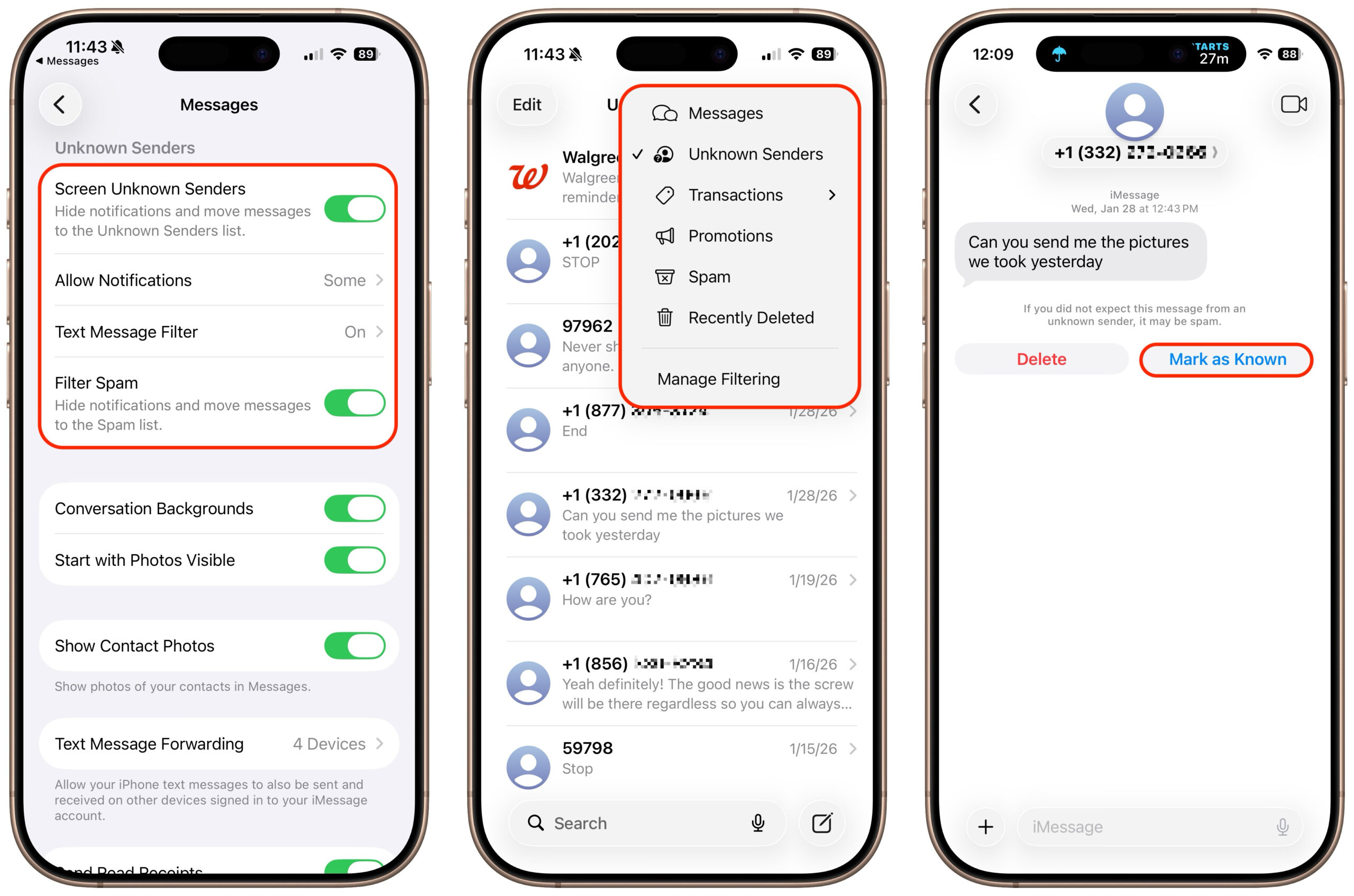
If you’re losing messages or calls? look pa in iOS, iPadOS, and macOS 26, Apple added filtering in Messages and Phone that can hide texts and calls from unknown people or those marked as spam. In Messages, open the app, tap the Filter button in the upper-right corner, tap Manage Filtering, and turn on Screen Unknown Senders and Filter Spam. Once enabled, the Filter menu gains Unknown Senders and Spam, and while a text from an unknown person will still trigger a red badge on the app icon, it won’t appear in the usual list. Instead, use the Filter menu—which also gets a blue badge—to check those separate lists. The Phone app works similarly: enable call filtering in Settings > Apps > Phone under Call Filtering, and unknown callers will appear in separate lists accessible from the Filter button in Recents or Calls. To move a conversation out of Unknown Senders, tap Mark as Known. These tips should help prevent you from losing messages.
(Featured image by iStock.com/Liubomyr Vorona)