
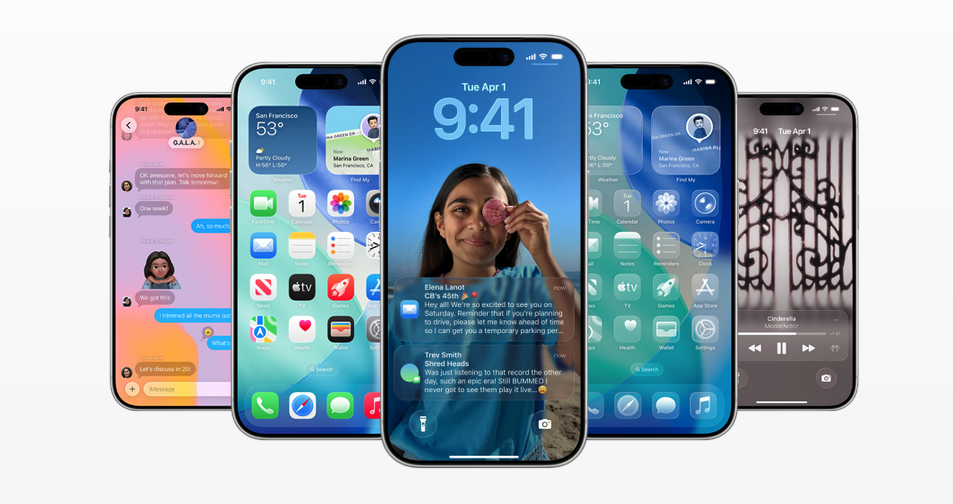
iOS 26 has landed: announced at WWDC back in June, it officially launched on September 15 and is free to download right now. You can grab it today—or stop by if you’d like a hand (we promise not to judge your password habits).
A Fresh Look: Liquid Glass
iOS 26 brings a striking design update called Liquid Glass. The new look makes apps, icons, and widgets appear fluid and consistent across devices. It’s sleek, translucent, and might just tempt you to swipe around for no reason other than to admire it.
Smarter, Friendlier Features
Sure, the shiny new design is nice to look at—but iOS 26 isn’t just a pretty face. It sneaks in practical upgrades too, the kind that actually make your daily phone wrangling smoother. Here are some that I look forward to using:
- Apple Intelligence Everywhere: Smarter AI integrated across apps. It translates calls live, creates personalized images, and suggests smarter actions.
- Call Screening: Unknown callers can be screened before you pick up, helping you avoid robocalls while still answering Grandma.
- Lock Screen with Spatial Scenes: Wallpapers now adapt in three dimensions and reposition the time so it doesn’t block faces in your photos.
- Messages Updates: Group chats now include polls and custom backgrounds. Organizing dinner plans has never been easier.
One of my favorite new tricks in iOS 26? A tiny feature you didn’t know you needed… until now
Let’s be honest: life is messy. Between pockets, purses, and snack breaks, your camera lens is basically a magnet for smudges.
Enter Lens Cleaning Hints in iOS 26. Available on iPhone 15 and later, this feature alerts you when your camera lens needs a wipe before you waste a perfect sunset shot.
It’s enabled by default on supported phones, but if you want to check, here’s how to enable Lens Cleaning Hints:
- Open Settings
- Tap Camera
- Toggle on Lens Cleaning Hints
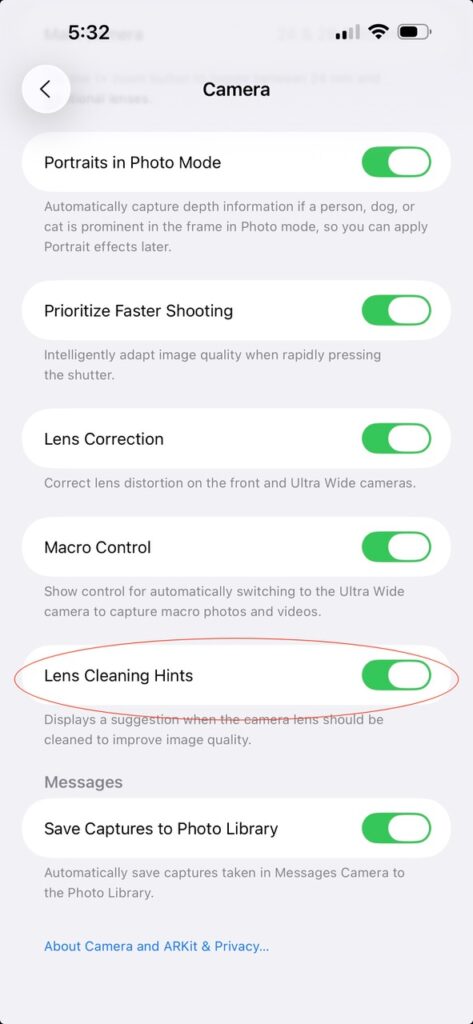
It’s enabled by default on supported phones, but it’s worth checking. A small nudge from your iPhone could save your next Instagram moment.
Additional Camera Highlights in iOS 26
Smudge-free photos are just the start. iOS 26 also slipped in a few other handy camera tricks you’ll actually use:
- Simplified Camera Modes: Photo and Video are now up front, with other modes just a swipe away.
- AirPods as Camera Remote: On AirPods with the H2 chip, (currently AirPods Pro 2 and the new AirPods 4, including the AirPods 3 series) you can press the stem to snap photos or start videos — and enjoy improved audio for recordings.
- Sharper Panoramas: Panoramic shots process faster and with less blur.
- Customizable Camera Controls: Adjust which settings appear and in what order for quicker access.
The Bottom Line
iOS 26 isn’t just about shiny glass effects — though those are eye-catching. It’s about smarter tools, cleaner photos, and smoother day-to-day experiences. Between call screening, Apple Intelligence, Messages upgrades, and Lens Cleaning Hints, this update is both practical and fun.
Update your phone now – because no one ever said, ‘Wow, that blurry sunset looks amazing.’ And let us know if you’d like a little extra help making your iPhone feel as futuristic as it sounds