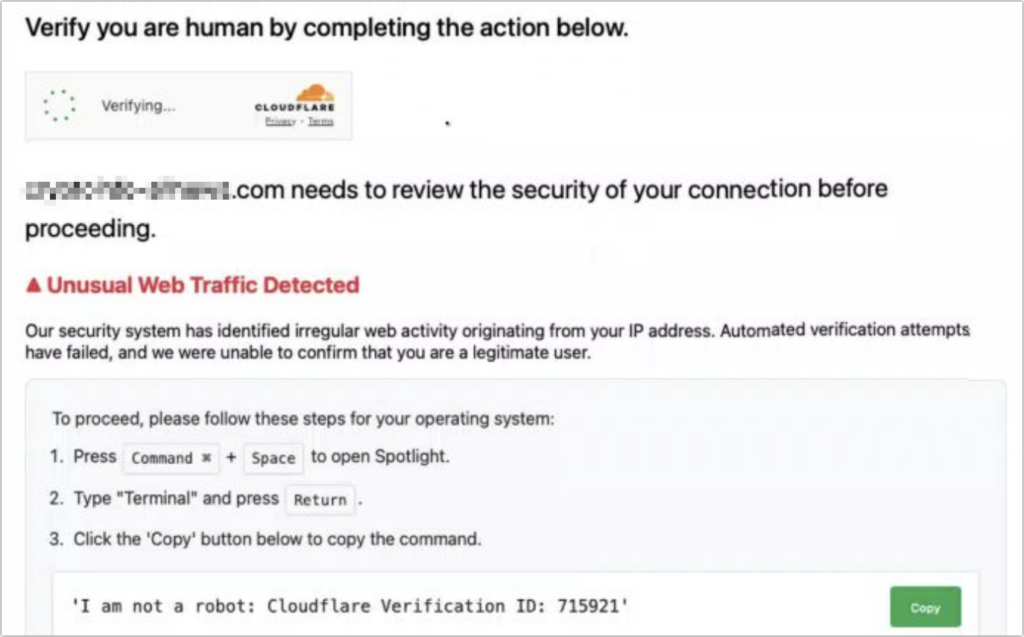
Here’s a new scam to watch for. A client recently ran across a suspicious website posing as a human verification test. Instead of asking him to click pictures or solve a simple math problem, the page told him to copy text from the site and paste it into Terminal. That is a major red flag. Terminal is a command-line tool that can download files, change security settings, open remote connections, and run scripts with the same access as the signed-in user. In this case, the pasted text was an encoded command designed to hide what it was doing. Once pasted and run, it could have quietly contacted a remote server, downloaded additional malware, and installed an infostealer built to harvest user data. Stolen information can include login passwords, browser history, saved cookies, cryptocurrency wallet details, keychain data, Notes data, SSH keys, and a wide range of personal files stored on the Mac. If a website ever tells you to open Terminal, press Return, or paste a command to “verify” your identity, “fix” your browser, or “unlock” content, close the page immediately. Legitimate websites do not require Terminal access for CAPTCHA checks. If you already pasted something, disconnect from Wi-Fi or Ethernet, do not enter any passwords, and have the Mac checked before using email, banking, or other sensitive accounts. The moral of the story: never paste unsolicited commands into Terminal. Even if the text looks harmless, scrambled, or unreadable, it can still execute powerful instructions that do real damage to your Mac.
(Featured image by iStock.com/stevanovicigor)
Social Media: A clever new scam masquerades as a CAPTCHA test, telling users to paste text into Terminal to prove they’re human. In reality, the command may be encoded to hide malicious actions such as downloading malware, stealing passwords, browser cookies, keychain data, and other sensitive information.
Contact G2 Computers in Washington Crossing
Need help? Contact G2 Computers today.